Claude does not break most projects. It exposes the ones that were already structurally fragile. The fix is not better prompting alone. It is designing a repo that an AI can operate inside without spreading confusion.
This is for engineers and engineering leads using any AI coding assistant — Claude Code, Cursor, GitHub Copilot, Windsurf — on growing codebases who are hitting the point where unstructured AI usage starts degrading consistency and increasing review load. The examples use Claude Code as the reference implementation, but the structural principles apply to any AI tool that operates inside your repository.
Most teams start using Claude Code in the most natural way possible. They drop in a task, paste a few files, ask for changes, review the output, and repeat.
At first it feels magical. Then the same pattern that felt fast starts to decay.
You get context bloat. Outputs become inconsistent. Good abstractions turn brittle. Small edits start causing collateral damage. The model is not getting worse. The system around it is revealing its limits.
The uncomfortable truth is simple: if your project is not designed for AI collaboration, it will degrade under AI usage.
This is the same shift I wrote about in How to Hyper-Optimize Claude Code. Context is now architecture. If you do not control it deliberately, it controls you.
Introduction
1. The Problem: Why Most Claude Projects Break
Most Claude workflows still look like this:
- Dump code into context
- Ask for changes
- Copy and paste results
- Repeat until the repo starts fighting back
That works for small tasks because the model can brute-force its way through local complexity. It does not work once the codebase grows, the team grows, or the number of parallel changes increases.
Then you hit the real costs:
- Context limits
- Inconsistent outputs
- Broken abstractions
- Increasing fragility with every iteration
Claude is not the failure point. Project structure is.
Teams often frame this as a prompting problem. It is usually an operability problem. The repo has too many hidden dependencies, too much implicit logic, or too much shape-shifting architecture for an AI to modify safely.
This article focuses on the structural fix — how to design a repo that an AI can operate inside reliably. The broader cost argument (why fragility accumulates in the first place, what it looks like in practice, and what it costs teams over time) is covered in The Hidden Cost of AI-Generated Code.
2. The Shift: From Codebases to AI-Operable Systems
Traditional codebases were designed around one reader: a human engineer with time, context, and tacit knowledge.
Claude-friendly codebases need to serve a second reader: an AI that is fast, capable, and useful, but only if the environment around it is legible.
The shift is not from quality to speed. It is from one kind of clarity to a stricter one.
| Old default | New default |
|---|---|
| DRY at all costs | Clear before clever |
| Abstract by instinct | Be explicit by default |
| Optimized for expert readers | Optimized for humans and AI |
| Implicit conventions | Predictable conventions |
The important distinction is this: AI-operable systems are not "dumbed down." They are easier to reason about. That is different. Boring structure is often a competitive advantage because it lowers the cost of safe change.
3. Core Principles of a Scalable Claude Project
Everything in this article comes back to five principles. These are not backed by controlled experiments — there is no rigorous study comparing repo structure A against repo structure B under Claude usage. They are derived from building and maintaining real codebases with Claude Code over an extended period. The claim is that they reduce friction and improve consistency in practice, not that they are provably optimal. Treat them as a framework to adapt, not a prescription to follow.
1. Locality
Keep related logic close together. If a feature is spread across eight folders with inconsistent naming, Claude has to infer too much before it can do useful work.
2. Explicitness
Remove hidden magic. Avoid patterns that depend on tribal knowledge, invisible side effects, or naming conventions nobody wrote down.
3. Isolation
Small, independent units are easier to modify than tangled systems. Isolation reduces blast radius for both humans and AI.
4. Predictability
If every feature uses a different internal pattern, Claude has to re-learn the repo every time. Repetition is not laziness here. It is leverage.
5. Context Control
You decide what Claude sees. That includes files, instructions, prompts, and supporting knowledge. Good output quality starts before the first request.
If you remember one thing, remember this: structure is now part of the prompt.
What to watch for
Since there is no controlled benchmark for repo structure quality under AI usage, the validation is observational. These are the signals that indicate the structure is working:
- Context size drops. A well-configured
.claudeignorealone typically reduces loaded context by 30–40%. If you are not measuring this, start — it is the most direct proxy for structural health. (See How to Hyper-Optimize Claude Code for measurement approach.) - Output drift decreases. After the first few iterations, AI-generated code should match your existing conventions without you explicitly restating them in every prompt. If you are still having to correct naming, file size, or abstraction depth every session, the context layer is not working.
- Review load stabilizes. In a well-structured codebase, review effort per AI-assisted feature should stay roughly flat as the team scales. If it is increasing, the model is generating outputs that require progressively more correction — a structural signal, not a model signal.
- Junior engineers can use AI unsupervised. This is the real test. If a less experienced team member can execute AI-assisted features without a senior review on every output, the structure is carrying quality standards rather than relying on individual judgment.
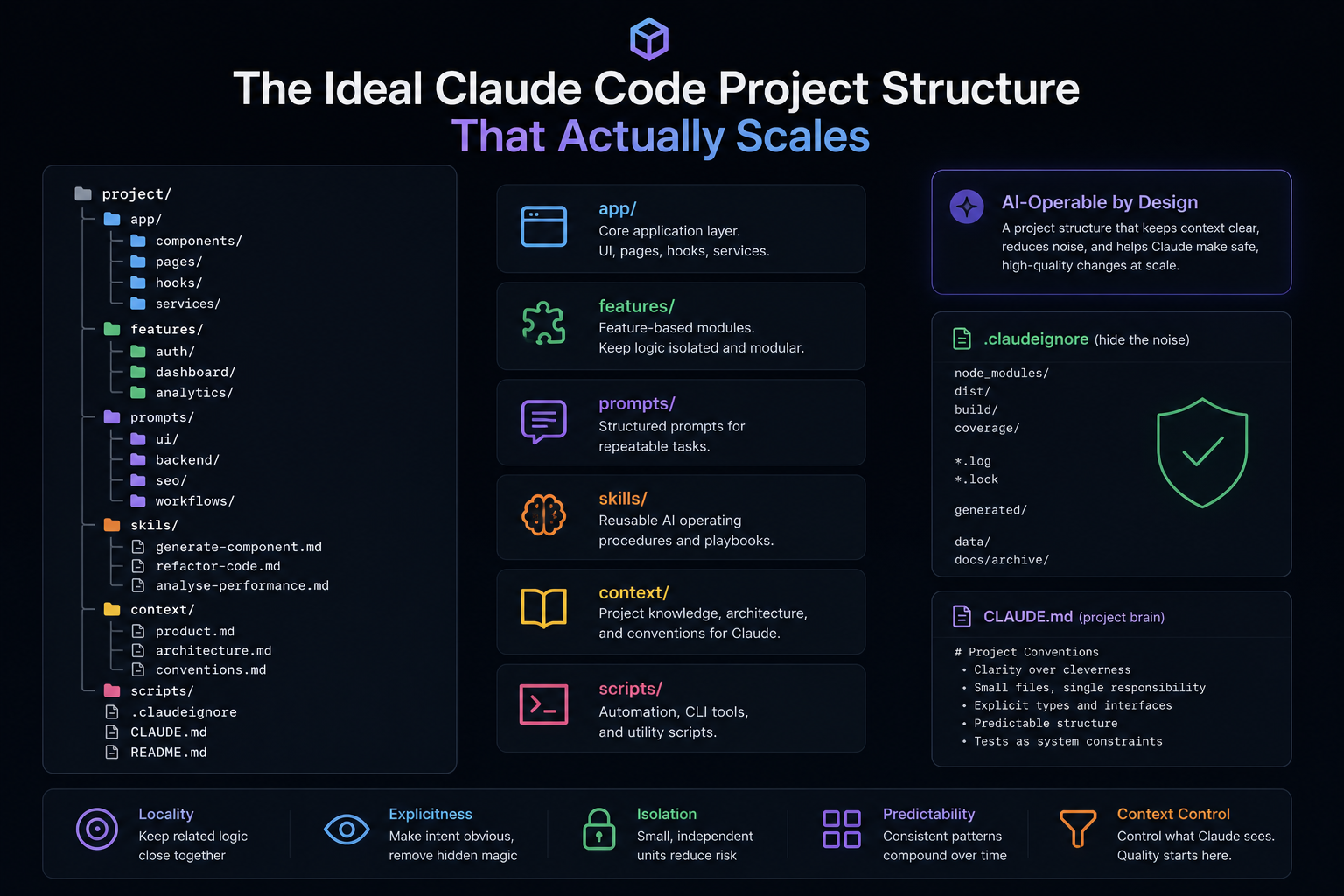
4. The Ideal Folder Structure
Note on scope: the structure below is cleanest to implement on a new project. If you are working on an existing codebase, a full structural redesign is rarely the right move. The incremental path is to introduce the /context layer and a CLAUDE.md first, then add prompt and skills organization as you build new features — without touching working code. The principles in section 3 apply to existing codebases; the specific folder layout below is most relevant for greenfield work.
Here is a practical baseline structure for a repo that needs to scale under Claude usage:
project/|+-- app/ # Core application| +-- components/| +-- pages/| +-- hooks/| +-- services/|+-- features/ # Feature-based modules| +-- auth/| | +-- AuthForm.tsx| | +-- useAuth.ts| | +-- auth.service.ts| || +-- dashboard/| +-- analytics/|+-- prompts/ # Your AI interface layer| +-- ui/| +-- backend/| +-- seo/| +-- workflows/|+-- skills/ # Reusable prompt systems| +-- generate-component.md| +-- refactor-code.md| +-- analyze-performance.md|+-- context/ # Structured knowledge for Claude| +-- product.md| +-- architecture.md| +-- conventions.md|+-- scripts/ # Automation / CLI tools|+-- .claudeignore+-- CLAUDE.md+-- README.mdThis works because each layer has a clear job:
features/keeps product logic modularprompts/separates intent from executionskills/stores reusable operating procedurescontext/becomes structured memory instead of scattered tribal knowledge
The difference is subtle but important. You stop merely using Claude inside your codebase. You start building a system Claude can operate inside.
5. The .claudeignore File (Your Hidden Superpower)
Most people underuse .claudeignore. That is one of the fastest ways to burn context on noise.
.claudeignore defines what Claude does not need to see.
node_modules/dist/build/coverage/
*.log*.lock
# Generated filesgenerated/
# Large datasetsdata/
# Old or irrelevant docsdocs/archive/
Without this, the model spends tokens processing irrelevant dependencies, generated output, and dead weight. With it, the working set gets cleaner, responses become faster, and the model has a better chance of focusing on the right layer of the system.
The rule of thumb is simple:
If a file does not help Claude make a better decision, hide it.
That principle compounds. It improves speed, cost, and reasoning quality all at once.
6. Prompt Organization That Actually Works
Random prompts do not scale. They create inconsistency because every task starts from a slightly different standard.
The better approach is to treat prompts like executable operating docs.
prompts/+-- ui/| +-- generate-component.md| +-- improve-layout.md|+-- backend/| +-- create-endpoint.md| +-- refactor-service.md|+-- seo/| +-- article-structure.md|+-- workflows/ +-- build-feature.md +-- debug-issue.mdExample prompt file:
prompts/ui/generate-component.md
You are a senior frontend engineer.
Context:- Feature: {feature}- Design intent: {design_description}
Task:Generate a React component.
Constraints:- Small and focused- Explicit props- No unnecessary abstraction
Output:- Component code- Explanation
This works because it is reusable, version-controlled, and composable. You are not improvising every time. You are executing a system.
7. Component Patterns for AI Collaboration
This is where a lot of teams quietly lose quality. Claude struggles when your architecture relies on deep nesting, hidden state, or abstractions that save lines at the cost of clarity.
Bad pattern:
const useData = () => { // 200 lines of logic}Better pattern:
export const fetchUser = async (id: string) => { return fetch('/api/users/' + id).then(res => res.json())}import { fetchUser } from './fetchUser'
export const useUser = (id: string) => { // simple hook logic}Claude performs better when:
- Files are smaller
- Logic is separated by purpose
- Naming is obvious
- The component tree is not doing too much in one place
A useful enforcement prompt looks like this:
You are a staff engineer.
Task:Refactor this code for clarity and AI collaboration.
Constraints:- Break into small files- Use clear naming- Remove hidden logic
Output:- Refactored structure- Explanation
Good structure is not just easier for Claude to edit. It is easier for your future team to trust.
8. Building Reusable "Skills" Inside Your Repo
Your skills/ folder becomes a leverage layer. It captures repeatable ways of working so the model stops starting from zero.
Example skill:
skills/generate-component.md
You are generating production-ready UI components.
Input:- Feature description
Steps:1. Define component purpose2. Define props explicitly3. Generate component4. Add minimal styling
Output:- Clean React component
Instead of saying "build a component," you can say "execute the generate-component skill for X." That one change improves consistency because the standard now lives in the repo, not only in your head.
That is what scales:
- Consistency
- Speed
- Reusable quality standards
9. End-to-End Example: From Idea to Feature
Here is what this looks like in practice.
Step 1 - Define the feature
Feature: User dashboardGoal: Show key metrics and recent activityStep 2 - Use a workflow prompt
You are building a feature.
Task:Break this into:- Components- Services- Data flow
Output:- File structure- Responsibilities
Step 3 - Generate components with a skill
Execute: generate-component skill
Input:- Dashboard metrics panel
Step 4 - Implement the service layer
// features/dashboard/dashboard.service.tsexport const fetchDashboardData = async () => { const res = await fetch('/api/dashboard') return res.json()}Step 5 - Iterate with targeted prompts
Improve this UI for clarity and hierarchy.The output is not just code. It is a structured feature with clear separation of responsibilities and a repo that remains understandable after the fifth iteration, not only the first.
10. Common Failure Modes (And How to Avoid Them)
The same problems show up again and again.
1. Over-abstraction
Problem: Claude gets confused because the real logic is buried under indirection.
Fix: Flatten the architecture until the path from request to behavior is obvious.
2. Giant files
Problem: Too much context in one place leads to worse edits and a larger blast radius.
Fix: Split aggressively by responsibility, not by arbitrary line count.
3. Prompt chaos
Problem: Teams keep rediscovering the same instructions with slightly different wording and quality.
Fix: Store prompts in /prompts and reusable procedures in /skills.
4. No context layer
Problem: Claude has no stable source of truth for product logic, architecture, or conventions.
Fix: Keep a /context folder with explicit reference docs.
Example context/architecture.md:
- Frontend: React (functional components)- Data fetching: simple fetch, no heavy libs- State: local first, minimal global state- Philosophy: clarity over abstractionNone of these fixes are glamorous. That is exactly why they work. The teams getting durable leverage from Claude are usually the teams willing to invest in the boring architecture that keeps the model aligned.
11. Final Thoughts
Most developers are still using Claude like a chatbot. That is fine for small tasks. It does not scale into a repeatable engineering system.
The real upgrade is turning your project into an environment Claude can operate inside predictably.
In my experience, when the structure is right:
- Output consistency improves across sessions — the model stops "forgetting" conventions it should already know
- Review load stabilizes even as AI-generated volume increases — outputs fit existing patterns without constant correction
- The compounding effect of AI assistance grows rather than plateauing — each improvement to the context layer is immediately felt by everyone working in the repo
The difference is rarely dramatic on day one. The gap becomes visible after fifty or a hundred edits, when a well-structured project still feels coherent and an unstructured one has accumulated enough drift that context overload becomes the dominant cost.
The concrete version of this: a team that reaches 50% AI-assisted code generation with good structural discipline spends engineering time on reviews and direction. The same team without it spends engineering time on corrections, context resets, and debugging outputs that were locally plausible but globally inconsistent. The model did not change between those two teams. The environment did.
Bad setup creates constant friction. Good setup creates leverage. Whether the upfront investment is worth it depends on how long you plan to operate inside the codebase — it is front-loaded, not free. But for any project with a runway beyond a few months, the question is not whether to invest in structure. It is when.
Conclusion
Most teams treat AI coding tools as a generation layer on top of whatever structure they already have. That works until it does not. The degradation is predictable: inconsistency first, then context overload, then a growing correction tax that erodes the speed advantage you came for.
The structural approach flips the dependency. The repo becomes the stable layer. The AI operates inside it. Outputs improve not because the model improves, but because the environment it is working in stops changing unpredictably beneath it.
Start with the /context layer and a CLAUDE.md. That alone changes the baseline quality of every session. Add .claudeignore. Measure the context size before and after. The rest follows from what you observe.