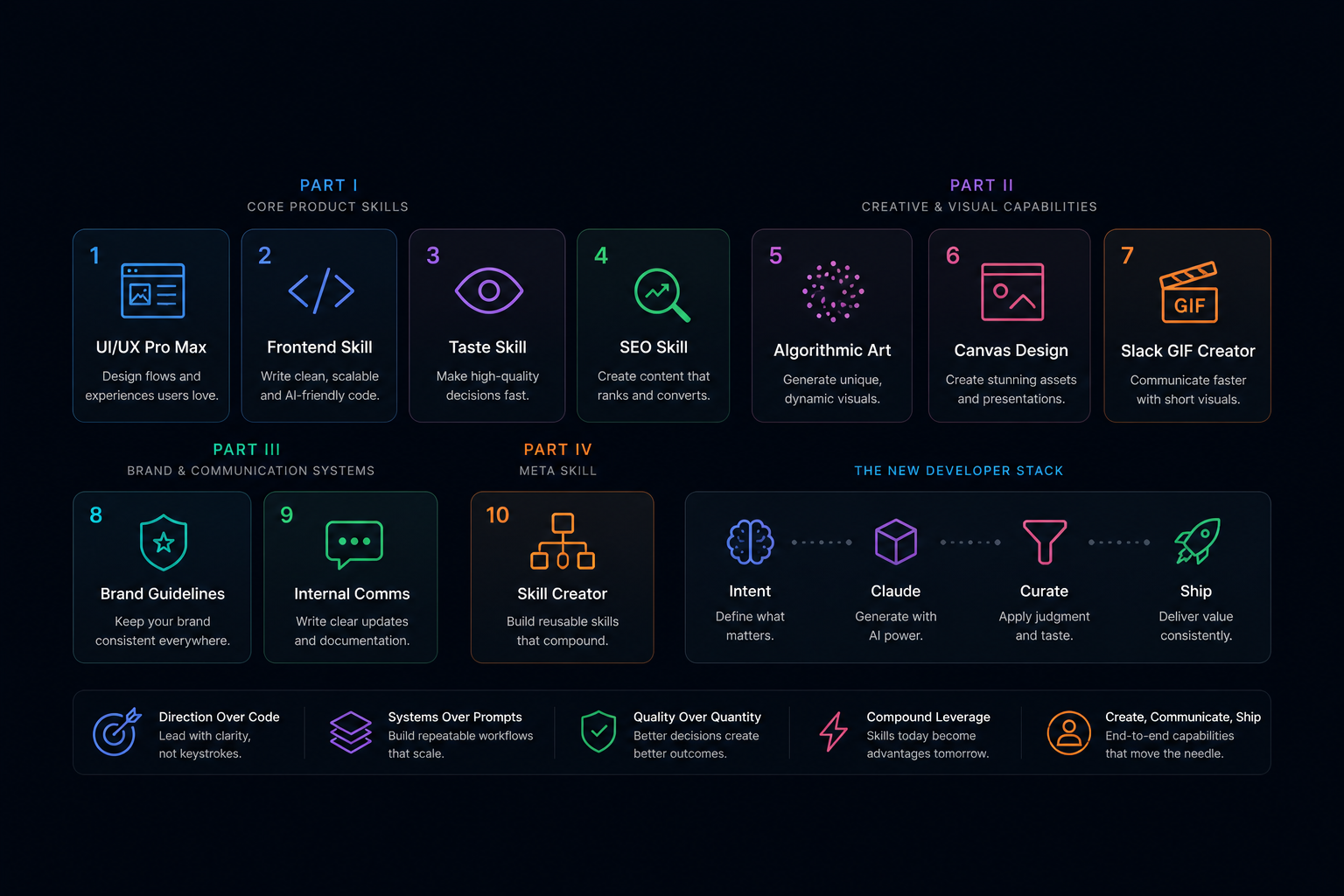
The bottleneck is no longer writing code from scratch. It is knowing what to ask for, what to keep, what to kill, and how to turn Claude into a repeatable production system.
This is for engineers actively using Claude Code on real projects who want to improve output quality and consistency beyond the default prompting experience.
Claude Code does not just make you faster at writing code. It changes what your job actually is.
The best developers are no longer the people who manually write every line, optimize syntax, or memorise every API. They are the people who design systems of intent, curate outputs, and iterate with judgment.
The constraint moved from "Can you build this?" to "Do you know what good looks like?"
This is the real shift. Claude can generate almost anything. Your edge is deciding what deserves to exist.
The Fundamental Shift: From Coding to Directing
Modern web development is becoming a direction problem, not a typing problem. Claude can help with implementation, but it still needs a human who can define the target state clearly enough that the output becomes useful.
That means the highest leverage skills are becoming surprisingly cross-functional. Product judgment matters. Visual taste matters. Brand consistency matters. Communication matters. The developers who embrace that shift will ship faster and with more differentiation. The ones who do not will generate a lot of average-looking work very quickly.
The skills below are not "nice to have" extras. They are the stack around the stack.
One clarification worth making upfront: the prompts in each section are starting points, not the skill itself. The skill is the judgment you use to evaluate the output — to know what to keep, what to kill, and what to push further. That judgment is teachable, but it develops through deliberate practice, not through reading prompt templates. Each section below includes one concrete exercise designed to build the underlying judgment, not just give you a better starting prompt.
Part I: Core Product Skills
This is the layer that determines whether Claude helps you ship better products or just helps you produce more interface entropy.
1.1 UI/UX Pro Max
This is no longer optional. Claude can generate screens instantly, but it still cannot reliably design cohesive flows, emotional clarity, or frictionless interaction patterns. That is still your job.
What this skill now means:
- Understanding user journeys, not just screens
- Designing for clarity over cleverness
- Using Claude as a design partner, not a design replacement
The weak prompt is Build me a dashboard. The stronger workflow is to define the user goal, break the product into flows, prompt per state, and then refine spacing, hierarchy, and motion with intent.
You are a senior product designer.
Context:- Product: {product_description}- Target user: {user_type}- Primary goal: {user_goal}
Task:Design a complete UX flow for this product.
Break it down into:1. Entry points2. Key user journey steps3. States: empty, loading, error, success4. Exit or success condition
Constraints:- Prioritize clarity over cleverness- Minimize steps- Remove unnecessary decisions- Each step should have a single clear purpose
The developers who win here kill complexity early. They remove 30 to 50 percent of the noise before it ever reaches production, and they treat every screen like a landing page that needs to earn attention.
Exercise for developing this judgment: Pick any product you use daily. Screenshot three separate screens. For each one, answer: (1) What is the primary action on this screen — can you identify it in under three seconds? (2) What cognitive load does the screen impose — how many things compete for attention at once? (3) What would you remove? Write one sentence per screen on the specific change you'd make and why. Do this weekly with different products for a month. You are building a vocabulary for friction — the ability to name what is wrong before you can describe what would be better.
Success criteria: you can complete any random app in under five minutes and name one specific change per screen — not "simplify it" but "remove the secondary navigation link in the header because it competes with the primary conversion action." If you can't name a specific change, the vocabulary isn't there yet. Keep going.
1.2 Frontend Skill
Frontend matters more now, not less. Claude can generate React quickly, but it still over-engineers, misses system constraints, and struggles with long-term consistency if your codebase is already messy.
Frontend skill in the Claude era means structuring code for AI collaboration. Good frontend code is readable, predictable, and extendable. It is code an AI can safely edit without breaking everything.
Patterns that matter:
- Flat component hierarchies
- Explicit props
- Clear naming over abstraction
- Small, focused responsibilities
If Claude struggles to modify your code, your system is already telling you something uncomfortable.
Exercise for developing this judgment: Take a component you wrote three months ago and ask Claude to explain back to you what it does and why it is structured the way it is. If Claude misunderstands the intent, invents reasons for a design decision, or gets confused about what a prop controls — your code is not yet structured for AI collaboration. The test is not whether Claude can edit it. It is whether Claude can read your intent accurately without you explaining it. Run this test on your five most-used components. The gaps are your refactoring roadmap.
Success criteria: Claude accurately describes the intent of all five components without requiring clarification or correction from you. One misunderstanding: refactoring candidate. Three or more: the codebase isn't yet structured for AI collaboration, regardless of how readable it feels to you.
You are a senior frontend engineer writing code for AI collaboration.
Task:Build a React component for: {feature_description}
Constraints:- Keep components small and focused- Use explicit props- Avoid over-abstraction- Use clear naming- Add brief comments explaining intent
Output:- Component code- Short explanation of structure
That prompt works because it encodes a standard. Without standards, Claude mirrors chaos. With standards, it compounds them.
1.3 Taste Skill
This is the highest leverage skill on the list. Claude can generate infinite variations, but it cannot tell you which one feels premium, which one converts, or which one is coherent across the rest of the product.
Taste is decision quality under abundance. When options become cheap, discernment becomes expensive.
You are filtering:
- Layouts
- Copy
- Color
- Motion
- Structure
The practical loop is simple: generate five variants, kill four aggressively, then refine the best one until it feels deliberate.
You are a product designer with exceptional taste.
Context:- Product: {product}- Goal: {goal}
Task:Generate 5 different design approaches.
Constraints:- Each must feel distinct- Aim for premium, minimal design- Avoid generic SaaS patterns
Then:- Critique each option- Select the best one- Explain why
Most developers do not lack skill. They lack standards. Claude exposes that gap brutally because it gives you more options than you can hide behind.
Exercise for developing this judgment: This is the most important exercise on this list. Go to Dribbble, Awwwards, or any curated design gallery. Find ten examples — mix of ones you like and ones you don't. Force-rank them 1–10. Then write one sentence per entry explaining the specific design decision that earned its position — not "I like the colors" but "the whitespace in the header creates breathing room that makes the CTA feel less pressured." After twenty sessions of this, you will have a working vocabulary for quality. Once you can describe what makes something feel premium or generic, you can put that description in a prompt. Until then, your taste is intuitive but not yet transferable.
Success criteria: your one-sentence explanations use specific design vocabulary — whitespace, typographic hierarchy, contrast ratio, visual weight — rather than aesthetic preference. "It feels cleaner" is not a reason. "The reduced line height tightens the information density and makes the CTA float" is a reason. That shift is the skill.
1.4 SEO Skill
SEO changed, but it did not disappear. Claude made content generation trivial, which means low-quality content exploded and differentiation got harder.
What matters now is still the same core discipline: search intent alignment, information structure, and topical authority. Claude is useful for accelerating drafts and outlines. It is not a substitute for real positioning, experience, or narrative.
A strong workflow looks like this: generate an outline from keyword clusters, expand section by section, then inject first-hand opinion and practical judgment so the piece says something worth reading.
You are an SEO strategist and editorial operator.
Context:- Primary keyword: {keyword}- Search intent: {intent}- Audience: {audience}
Task:Create an article outline that can rank and still feel opinionated.
Constraints:- Match search intent exactly- Use clear information hierarchy- Surface places to add real experience and original insight- Avoid filler and generic SEO language
Publishing AI-generated content without editing, positioning, and narrative is not leverage. It is just noise at scale.
Part II: Creative and Visual Capabilities
This is where developers start to become creatively dangerous. Not because they turn into designers overnight, but because they can now explore visual systems that were previously too expensive to prototype.
2.1 Algorithmic Art
Algorithmic art is one of the most underused developer advantages. With tools like p5.js, you can generate backgrounds, interactive visuals, and brand elements that feel custom instead of generic.
Concepts worth understanding:
- Seeded randomness for reproducibility
- Flow fields for organic motion
- Particle systems for dynamic visuals
That matters because unique visuals create memory. They make a site feel owned rather than assembled.
You are a creative technologist working in p5.js.
Task:Design a generative hero background for {brand_or_product}.
Constraints:- Use seeded randomness for reproducibility- Keep it lightweight and performant- The mood should feel {mood}- Avoid looking like a default code demo
Output:- Visual concept- Core algorithm idea- Performance considerations
Most developers ignore this layer. That is exactly why it can become an edge.
2.2 Canvas Design
Not everything you ship is a web page. You still need social visuals, PDFs, infographics, launch assets, and internal documents that do not feel like exported templates.
Canvas design means understanding layout systems, typography pairing, and color hierarchy well enough to direct Claude usefully. Claude can generate structured layouts and suggest hierarchy. Your role is to make it feel intentional.
You are a visual designer creating a one-page asset.
Context:- Format: {social_post_or_pdf_or_infographic}- Audience: {audience}- Goal: {goal}- Content: {content_summary}
Task:Create a structured layout direction.
Constraints:- Strong visual hierarchy- Typography must feel deliberate- Avoid template energy- Keep the composition simple enough to execute fast
The bar is not whether it looks "nice". The bar is whether it feels designed on purpose.
2.3 Slack GIF Creator
This sounds trivial until you work inside a real team. Internal culture and communication are product systems too.
A good GIF or short visual demo speeds up communication, improves engagement, and strengthens team identity. It helps with bug reproduction, feature highlights, and product demos without forcing everyone into another meeting.
Constraints matter:
- File size limits
- Loop clarity
- Visual simplicity
You are creating a Slack-ready product GIF.
Context:- Feature or bug: {feature}- Audience: {team_or_stakeholder}- Goal: {explain_or_demo_or_report}
Task:Plan a short looping GIF storyboard.
Constraints:- Show the core action in under 8 seconds- Each frame should be easy to understand without narration- Highlight the important UI state changes- Keep the loop clean
Small communication assets can remove surprising amounts of friction from execution.
Part III: Brand and Communication Systems
The more AI-generated output you create, the more consistency becomes a competitive advantage. Without constraints, everything drifts.
3.1 Brand Guidelines
Brand guidelines are no longer just for large design teams. They are operational infrastructure for working effectively with AI.
Strong brand guidelines define the primary palette, UI tokens, copy style, spacing rules, and tone of voice. Then they enforce those standards across prompts and outputs.
Why this matters:
- AI outputs stay consistent
- Iteration gets faster
- Rework drops
You are building a compact brand system for AI-assisted product work.
Context:- Brand: {brand}- Market position: {positioning}- Product type: {product_type}
Task:Create practical brand guidelines that can be reused in prompts.
Include:- Primary palette- Typography direction- Spacing rules- UI tone- Copy style
Constraints:- Keep it specific- Make it operational, not fluffy
Once you have that system, Claude stops improvising a new identity every time you ask for help.
3.2 Internal Comms
Most teams are still bad at internal communication. Claude makes it easier to write updates, summarize progress, and create documentation, but the value is not in more text. The value is in less confusion.
Good internal communication is clear, concise, and actionable. It turns ambiguity into momentum.
Formats worth systematizing:
- Weekly updates
- Project briefs
- FAQs
- Decision logs
You are a chief of staff for an engineering organization.
Context:- Project: {project}- Audience: {audience}- Current status: {status_notes}- Decisions needed: {decisions}
Task:Write a concise internal update.
Constraints:- Be clear and direct- Separate facts from risks- End with specific next actions- Remove any unnecessary jargon
That sounds small. It is not. Less confusion usually means faster execution, fewer meetings, and fewer invisible delays.
Part IV: Meta Skill
4.1 Skill Creator
This is the unlock most people miss. Instead of using Claude ad hoc, you build repeatable capabilities.
A skill is not magic. It is a structured prompt with constraints that produces consistent output. Over time, that compounds because you stop solving the same framing problem from scratch.
Instead of prompting Design a landing page every time, you create a reusable system with clear inputs, defined constraints, and predictable outputs. That moves you from improvisation to leverage.
You are designing a reusable Claude skill.
Task:Turn this repeated workflow into a structured capability.
Workflow:{describe_recurring_task}
Define:1. Inputs required2. Step-by-step process3. Constraints and quality bar4. Output format5. Failure modes to avoid
Goal:Make the skill reusable across projects with consistent quality.
The people who build skills move faster, produce higher quality, and avoid rework because they are scaling judgment, not just prompts.
Exercise for developing this judgment: Pick any task you do more than twice a week with Claude. Attempt it with a blank prompt — no structure, no context, just the raw request. Write down every place where Claude got the output wrong, made a wrong assumption, or required you to clarify. That list of corrections IS your skill template. Each item is either a missing constraint, a missing input, or a missing quality bar. Turn the three most common corrections into explicit prompt parameters. Run the task again. The gap between attempt one and attempt two is how much value a well-built skill unlocks.
Success criteria: run the raw unstructured prompt and count the corrections required. Build the skill. Run the task again. If the correction count drops by 60% or more, the skill is working. If it doesn't, you missed a constraint — go back to the correction list and look for the pattern you skipped.
The New Developer Stack
The modern developer is no longer just backend, frontend, and DevOps. The stack now includes taste, design, communication, and systems thinking.
Claude sits across all of it. But it only amplifies what is already there. If your thinking is sharp, your workflows get stronger. If your standards are weak, you just generate weak work faster.
That is why this shift matters so much. AI is compressing implementation. The remaining leverage moves upstream into judgment.
Final Thoughts
Most people still approach Claude like a faster IDE. That undersells it.
It is closer to a junior developer, a designer, a writer, and a strategist sitting beside you at the same time. But like every leverage tool, it amplifies quality asymmetrically. Weak input creates weak output. Strong taste creates exponential results.
If you focus on one thing from this list, focus on this: taste plus structured workflows beat raw prompting every time.
That is the difference between generating content and building products that actually stand out.